
Create an email forwarder in cPanel

Step 1: Click on forwarder’s icon
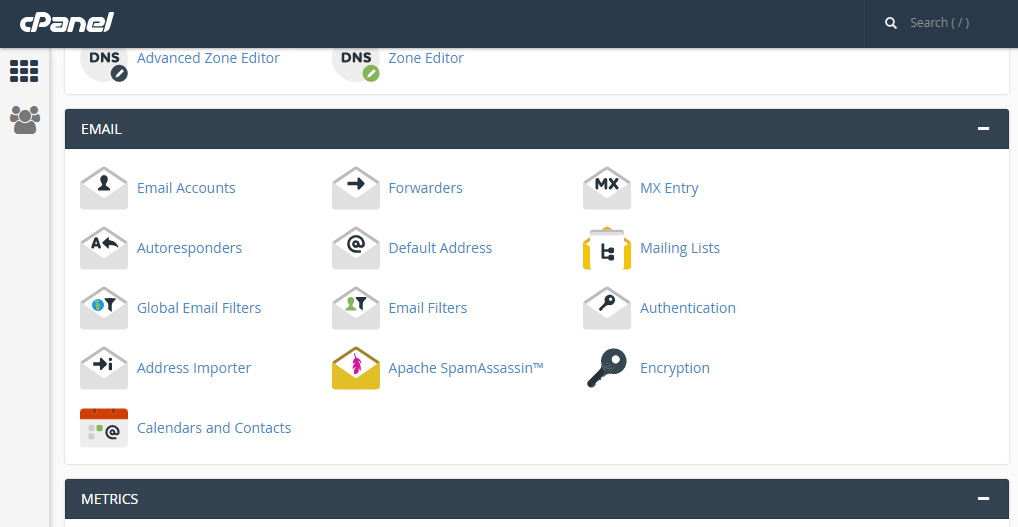
 

Step 2: Click on add forwarder

Step 3: Add the email id that has to to be forwarded along with the domain name

Step 4: In the destination tab, add the email where the forwarded  mail should be copied and click on 'add forward'

All the emails will be forwarded to the destination mail.


  • 0 Utilizadores acharam útil
Esta resposta foi útil?

Related Articles

Delete a domain forwarder in cPanel

Step 1: On the home screen under the Email tab, Click on Forwarders     Step 2: Locate the...

CREATING FOLDER IN SQUIRRELMAIL

Step 1: After logging into ‘squirrelmail’ on the home screen, click on ‘Folders’ option.   Step...

SETUP A CRON JOB IN CPANEL

Step 1: After logging into cPanel, on the home screen Click on the ‘cron jobs’ under Advanced tab...

CHANGING YOUR CPANEL STYLE

After logging into cPanel on the home screen Step 1: click on ‘change style’ under the...

SEARCHING MESSAGES IN SQUIRREL MAIL.

Step 1: After logging to the squirrelmail webmail on the home screen, Click on ‘Search’....