
Create an email forwarder in cPanel

Step 1: Click on forwarder’s icon
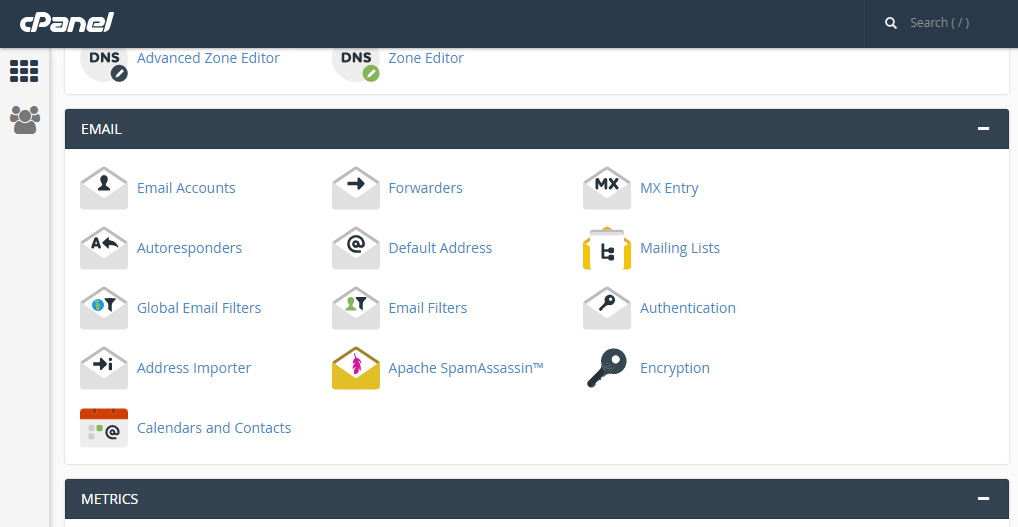
 

Step 2: Click on add forwarder

Step 3: Add the email id that has to to be forwarded along with the domain name

Step 4: In the destination tab, add the email where the forwarded  mail should be copied and click on 'add forward'

All the emails will be forwarded to the destination mail.


  • 0 משתמשים שמצאו מאמר זה מועיל
?האם התשובה שקיבלתם הייתה מועילה

Related Articles

WRITING AN EMAIL MESSAGE IN ROUNDCUBE

Step 1: On the home screen of Roundcube, click on the ‘create’ icon   Step 2: This is where you...

USING MULTIPLE IDENTITIES IN ROUNDCUBE

Step 1: On the home screen of Roundcube, click on the ‘personal settings’ link   Step 2: Click...

Add an MX Entry in cPanel

Step 1: After logging into cPanel, on the home screen Click on the MX Entry icon      Step 2:...

CONFIGURING GLOBAL OPTIONS IN HORDE

Step 1: After logging into Horde, click on ‘options’ Step 2: There are many different options...

CREATE A SUBDOMAIN IN CPANEL

Step 1: On the home screen of the cPanel, click on ‘Sub Domain’     Step 2: Enter the prefix...