
Create an email forwarder in cPanel

Step 1: Click on forwarder’s icon
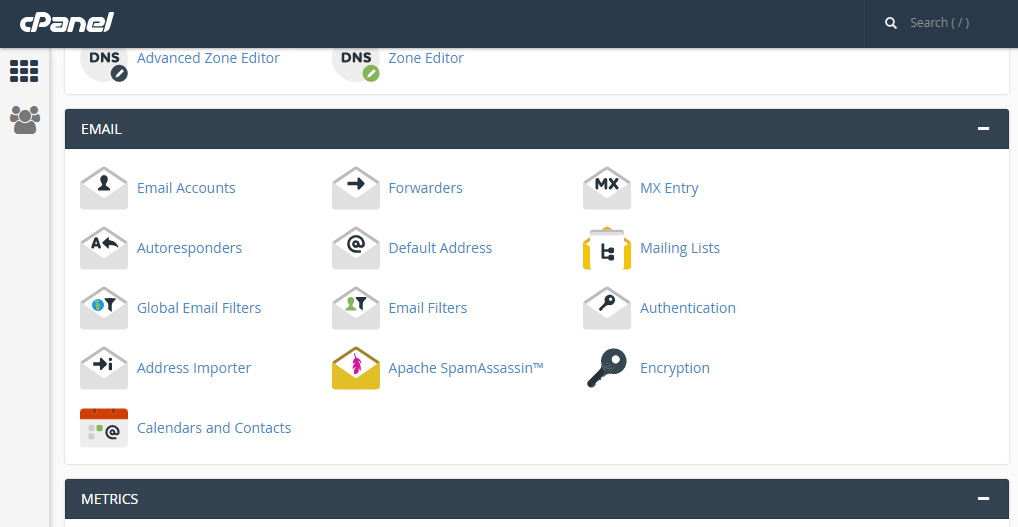
 

Step 2: Click on add forwarder

Step 3: Add the email id that has to to be forwarded along with the domain name

Step 4: In the destination tab, add the email where the forwarded  mail should be copied and click on 'add forward'

All the emails will be forwarded to the destination mail.


  • 0 Gebruikers die dit nuttig vonden
Was dit antwoord nuttig?

Related Articles

HIGHLIGHTING THE MESSAGE IN SQUIRRELMAIL.

Step 1: After logging to the squirrelmail web mail on the home screen, click on the ‘Options’....

Backing up Website in cPanel

 On the home screen click on Backup wizard       Click on backup    One can either...

Display and log errors for PHP

Editing the php.ini to display errors The php.ini by default should have the errors enabled;...

USE THE DISK SPACE USAGE TOOL IN CPANEL

Step 1: After logging into cPanel, on the home screen Click on the ‘Disk Usage’ under Files tab...

CREATE A SUBDOMAIN IN CPANEL

Step 1: On the home screen of the cPanel, click on ‘Sub Domain’     Step 2: Enter the prefix...