
Create an email forwarder in cPanel

Step 1: Click on forwarder’s icon
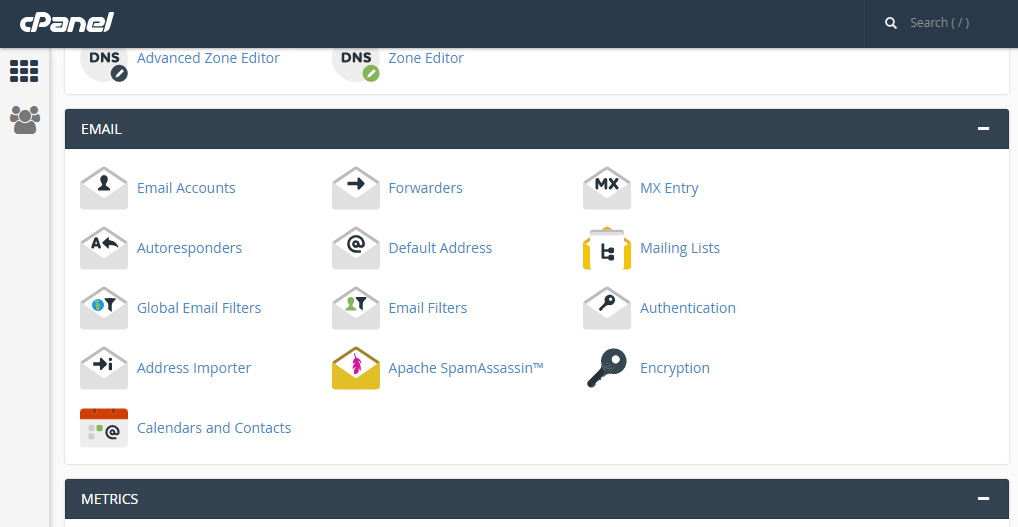
 

Step 2: Click on add forwarder

Step 3: Add the email id that has to to be forwarded along with the domain name

Step 4: In the destination tab, add the email where the forwarded  mail should be copied and click on 'add forward'

All the emails will be forwarded to the destination mail.


  • 0 Los Usuarios han Encontrado Esto Útil
¿Fue útil la respuesta?

Related Articles

CREATING FOLDERS IN HORDE

Step 1: After logging into the Horde webmail, click on the ‘Mail’ link   Step 2: Click on the...

MODIFYING THE INDEX ORDER IN SQUIRRELMAIL.

Step 1: After logging to the squirrelmail on the home screen, Click on ‘Options’.       Step...

EDITING YOUR PERSONAL INFORMATION IN THE SQUIRREL MAIL.

Step 1: After logging in to the squirrelmail webmail on the home screen, click on ‘Options’....

USING MULTIPLE IDENTITIES IN ROUNDCUBE

Step 1: On the home screen of Roundcube, click on the ‘personal settings’ link   Step 2: Click...

Backing up Website in cPanel

 On the home screen click on Backup wizard       Click on backup    One can either...