
Create an email forwarder in cPanel

Step 1: Click on forwarder’s icon
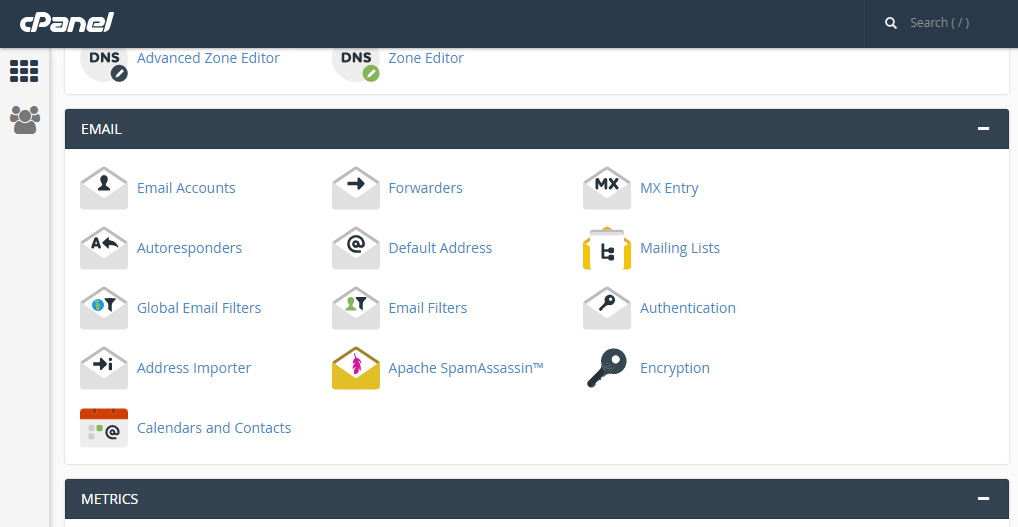
 

Step 2: Click on add forwarder

Step 3: Add the email id that has to to be forwarded along with the domain name

Step 4: In the destination tab, add the email where the forwarded  mail should be copied and click on 'add forward'

All the emails will be forwarded to the destination mail.


  • 0 A felhasználók hasznosnak találták ezt
Hasznosnak találta ezt a választ?

Related Articles

CREATE ADDITIONAL FTP ACCOUNTS IN CPANEL

Step 1: On the Home screen of the cPanel, Click on FTP Accounts under ‘Files’ tab       Step...

Mail delivery failed: returning message to sender

Mail delivery failed: returning message to sender errors are generally encountered when an...

OPENING AN EMAIL MESSAGE IN SQUIRRELMAIL.

Step 1: After logging in to squirrelmail on the home screen, click on the subject of email to...

MARK MESSAGES IN ROUNDCUBE

Step 1: On the home screen of Roundcube Webmail, the following image shows that the messages are...

SETUP AN AUTORESPONDER IN CPANEL

Step 1:Click on Auto-responder icon on your home screen   Step 2: Click on ‘add Autoresponder’...