
Create an email forwarder in cPanel

Step 1: Click on forwarder’s icon
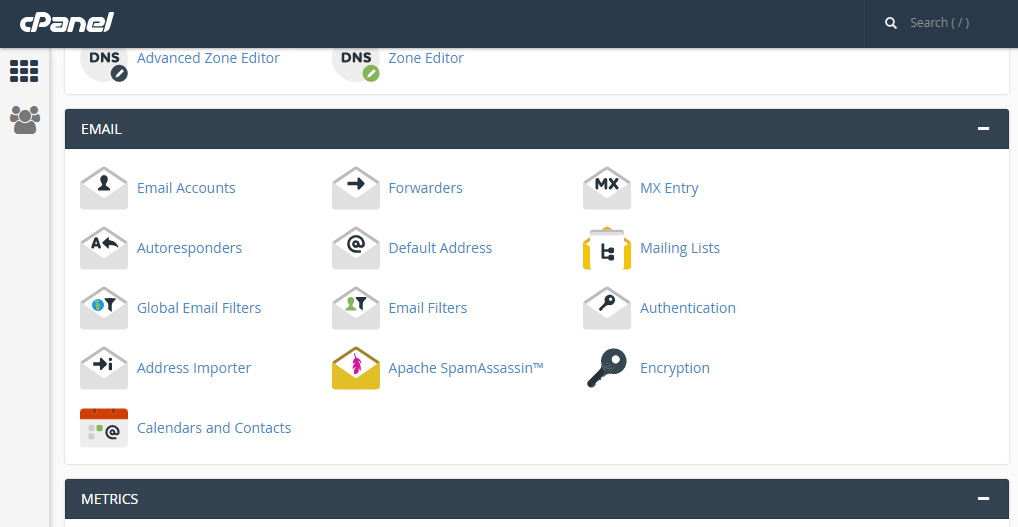
 

Step 2: Click on add forwarder

Step 3: Add the email id that has to to be forwarded along with the domain name

Step 4: In the destination tab, add the email where the forwarded  mail should be copied and click on 'add forward'

All the emails will be forwarded to the destination mail.


  • 0 Benutzer fanden dies hilfreich
War diese Antwort hilfreich?

Related Articles

Change WordPress admin username for security

Update Wordpress admin username Using the steps below, I'll show you how easy it is to add a new...

CREATE CUSTOM ERROR PAGES IN CPANEL

Step 1: On the Home screen of the cPanel, Click on the ‘error pages’ under ‘Advanced’ tab...

CREATING FOLDERS IN HORDE

Step 1: After logging into the Horde webmail, click on the ‘Mail’ link   Step 2: Click on the...

WRITING AN EMAIL MESSAGE IN ROUNDCUBE

Step 1: On the home screen of Roundcube, click on the ‘create’ icon   Step 2: This is where you...

CREATE A SUBDOMAIN IN CPANEL

Step 1: On the home screen of the cPanel, click on ‘Sub Domain’     Step 2: Enter the prefix...