
Create an email forwarder in cPanel

Step 1: Click on forwarder’s icon
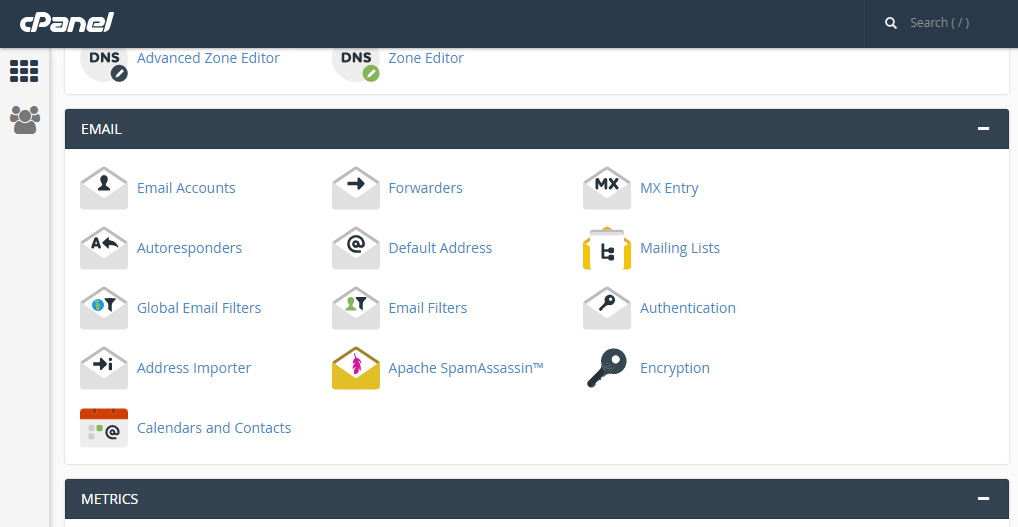
 

Step 2: Click on add forwarder

Step 3: Add the email id that has to to be forwarded along with the domain name

Step 4: In the destination tab, add the email where the forwarded  mail should be copied and click on 'add forward'

All the emails will be forwarded to the destination mail.


  • 0 Utilisateurs l'ont trouvée utile
Cette réponse était-elle pertinente?

Related Articles

CREATE TASKS IN HORDE

Step 1: After logging into Horde webmail, click on the ‘Task’ icon Step 2: Click on ‘new task’...

Create Folders in Roundcube

Step 1: After loging into Roundcube webmail, click on the ‘Personal settings’ link     Step 2:...

CHANGING THE PRIMARY LANGUAGE IN CPANEL

After into cPanel, you will first see the home screen. Follow the below steps to change the...

SETUP EMAIL FILTERS IN CPANEL

Step 1: After logging into cPanel, on the home screen Click on the ‘Email Filters’ button under...

CREATING FOLDERS IN HORDE

Step 1: After logging into the Horde webmail, click on the ‘Mail’ link   Step 2: Click on the...