
Create an email forwarder in cPanel

Step 1: Click on forwarder’s icon
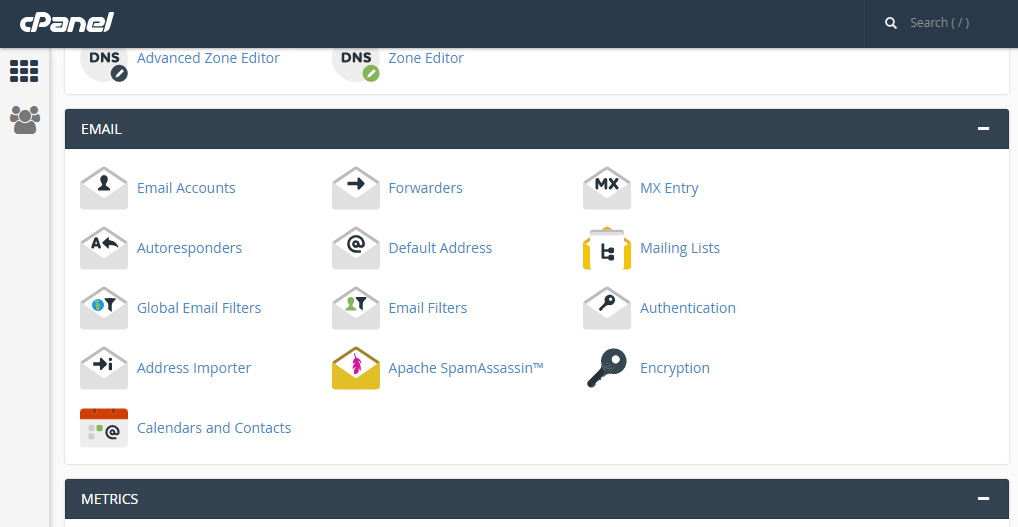
 

Step 2: Click on add forwarder

Step 3: Add the email id that has to to be forwarded along with the domain name

Step 4: In the destination tab, add the email where the forwarded  mail should be copied and click on 'add forward'

All the emails will be forwarded to the destination mail.


  • 0 Users Found This Useful
Was this answer helpful?

Related Articles

EXPORT CONTACTS FROM HORDE

Step 1: After logging into Horde webmail, click on the ‘Address Book’ icon Step 2: Click on...

TO SEARCH FOR MESSAGES IN ROUNDCUBE

Step 1: On the Home screen of roundcube webmail, there is a search box at the upper left corner....

Delete a domain forwarder in cPanel

Step 1: On the home screen under the Email tab, Click on Forwarders     Step 2: Locate the...

MODIFYING DISPLAY PREFRENCES IN SQUIRREL MAIL

Step 1: After logging in to the squirrelmail on the home screen, Click on ‘Options’....

Editing your Preferences in Roundcube

Step 1: After loging into Roundcube webmail, click on the ‘Personal settings’ link     Step 2:...