
Create an email forwarder in cPanel

Step 1: Click on forwarder’s icon
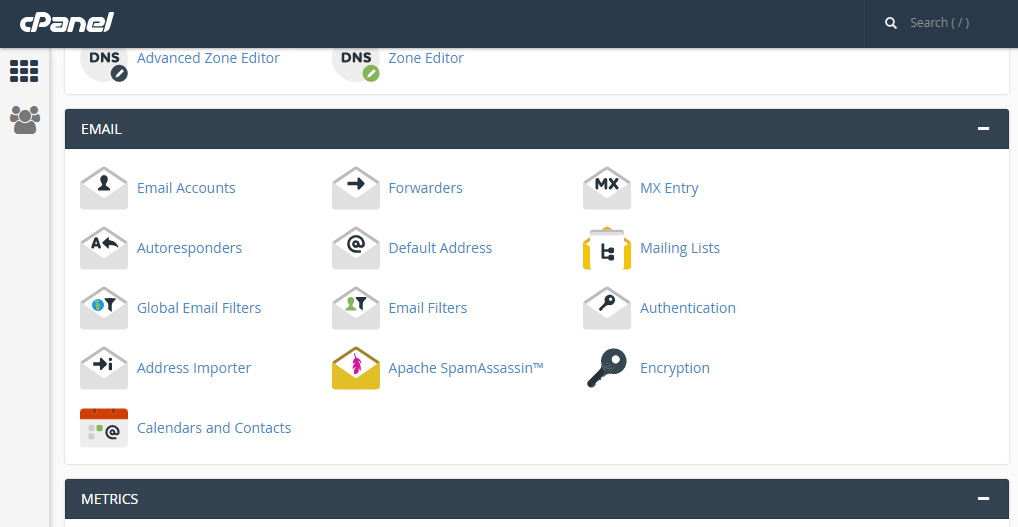
 

Step 2: Click on add forwarder

Step 3: Add the email id that has to to be forwarded along with the domain name

Step 4: In the destination tab, add the email where the forwarded  mail should be copied and click on 'add forward'

All the emails will be forwarded to the destination mail.


  • 0 أعضاء وجدوا هذه المقالة مفيدة
هل كانت المقالة مفيدة ؟

Related Articles

HIGHLIGHTING THE MESSAGE IN SQUIRRELMAIL.

Step 1: After logging to the squirrelmail web mail on the home screen, click on the ‘Options’....

CHANGE PHP DIRECTIVES GLOBALLY FROM WHM WITH EASYAPACHE 4

You can follow below steps to change the values of PHP directives for all the websites running a...

USING WEBMAIL FROM WITHIN CPANEL

Step 1: After logging into cPanel, on the home screen Click on the ‘Email Accounts’ tab...

SEARCHING MESSAGES IN SQUIRREL MAIL.

Step 1: After logging to the squirrelmail webmail on the home screen, Click on ‘Search’....

MANAGE YOUR CONTACTS IN HORDE

Step 1: After logging into Horde webmail, click on the ‘Address Book’ icon   Step 2: Click on...